
AAC-MCP
A TypeScript template for creating Model Context Protocol servers with stdio and SSE support.
README
MCP Server
A TypeScript template repository for creating Model Context Protocol (MCP) servers with support for both stdio (Standard Input/Output) and SSE (Server-Sent Events) transports. This template provides a solid foundation for building MCP servers with a well-organized structure and essential features.
Features
- 🚀 Built with TypeScript for type safety and better developer experience
- 🔄 Supports both stdio and SSE transports
- 📦 Includes example prompts, resources, and tools
- ⚡ Uses FastMCP for rapid development
Prerequisites
- Node.js
- npm or yarn package manager
Getting Started
-
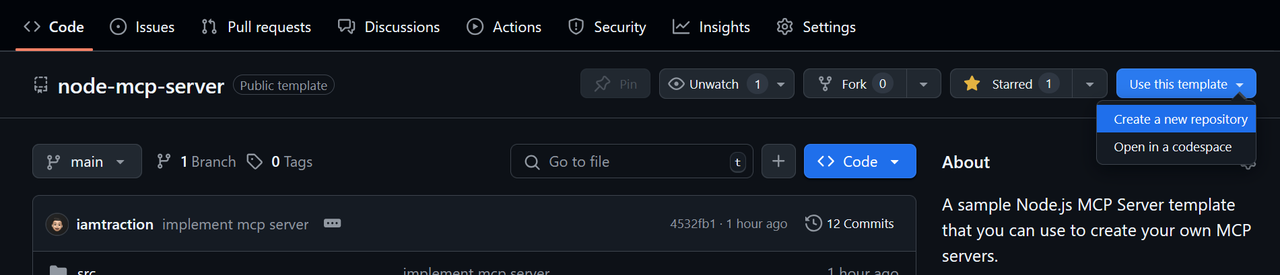
Create a repo from this template
Click Use this template > Create a new repository
-
Clone your repository
git clone https://github.com/iamtraction/node-mcp-server.git cd node-mcp-server -
Install dependencies
npm install -
Start development server
npm run dev
Project Structure
src/
├── prompts/     # MCP prompts
├── resources/   # MCP resources
├── tools/       # MCP tools
└── server.ts    # Main server file
Available Scripts
npm run dev- Start development server with hot reloadnpm run build- Build the TypeScript codenpm run start- Start the production servernpm run watch- Watch for TypeScript changesnpm run lint- Run ESLint to check code quality and style
Adding New Features
Adding a Prompt
Create a new file in src/prompts/ and add it to server.ts. Learn more about MCP Prompts:
import myPrompt from "./prompts/my-prompt.js";
server.addPrompt(myPrompt);
Adding a Resource
Create a new file in src/resources/ and add it to server.ts. Learn more about MCP Resources:
import myResource from "./resources/my-resource.js";
server.addResource(myResource);
Adding a Tool
Create a new file in src/tools/ and add it to server.ts. Learn more about MCP Tools:
import myTool from "./tools/my-tool.js";
server.addTool(myTool);
Configuration
The server can be configured in server.ts. By default, it runs on port 3000 with SSE transport. You can modify the configuration in the server.start() options.:
server.start({
    transportType: "httpStream", // or "stdio"
    httpStream: {
        port: 3000,
    },
});
Learn more about Transports.
Using the MCP Server
stdio Server Setup
{
    "mcpServers": {
        "example-server": {
            "command": "node",
            "args": [ "dist/server.js" ]
         }
    }
}
SSE Server Setup
{
    "mcpServers": {
        "example-server": {
            "url": "https://example-server.com/sse"
         }
    }
}
Contributing
Contributions are welcome! Please feel free to submit a Pull Request.
Showcase
Have you built something cool with this template? Add it to the showcase!
<!-- Add your project here -->
To add your project to the showcase:
- Edit this README.md file
- Add your project to the list above using this format:
- [Your Project Name](link-to-your-project) - Brief description- Submit a pull request
License
This project is licensed under the MIT License - see the LICENSE file for details.
Acknowledgments
- Model Context Protocol - The protocol specification
- MCP TypeScript SDK - The official TypeScript SDK
- FastMCP - The underlying MCP framework
Recommended Servers

playwright-mcp
A Model Context Protocol server that enables LLMs to interact with web pages through structured accessibility snapshots without requiring vision models or screenshots.

Magic Component Platform (MCP)
An AI-powered tool that generates modern UI components from natural language descriptions, integrating with popular IDEs to streamline UI development workflow.

Audiense Insights MCP Server
Enables interaction with Audiense Insights accounts via the Model Context Protocol, facilitating the extraction and analysis of marketing insights and audience data including demographics, behavior, and influencer engagement.

VeyraX MCP
Single MCP tool to connect all your favorite tools: Gmail, Calendar and 40 more.

graphlit-mcp-server
The Model Context Protocol (MCP) Server enables integration between MCP clients and the Graphlit service. Ingest anything from Slack to Gmail to podcast feeds, in addition to web crawling, into a Graphlit project - and then retrieve relevant contents from the MCP client.

Kagi MCP Server
An MCP server that integrates Kagi search capabilities with Claude AI, enabling Claude to perform real-time web searches when answering questions that require up-to-date information.

Neon Database
MCP server for interacting with Neon Management API and databases

E2B
Using MCP to run code via e2b.

Exa Search
A Model Context Protocol (MCP) server lets AI assistants like Claude use the Exa AI Search API for web searches. This setup allows AI models to get real-time web information in a safe and controlled way.

Qdrant Server
This repository is an example of how to create a MCP server for Qdrant, a vector search engine.